
1. Interval reset instructions
ZRST interval reset instructions (p) number is FNC40. It is of similar components in the bulk reset of the specified range. As shown in Figure 3-53, M8002 OFF → ON time, element M500~M599 mass reduction, the word component C235~C255 a reply.
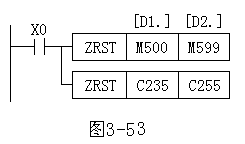
Interval reset commands should be used note:
1)[D1.] And [D2.] S, t, y, m, c, d, and should be of similar components, [D1] of element number should be less than [D2] specified component number, if [D1] of element number greater than [D2] component, only the [D1] Specifies the element is reset.
2) ZRST instruction only 16-bit processing, accounting for 5 programs, but [D1.] [D2.] You can also specify 32-bit counters.
2. Decoding and encoding instructions
(1) the decoding instructions DECO DECO (p) order number is FNC41. As shown in Figure 3-54, n=3 say [s.] 3-bit source operands, that is, X0, X1, X2. Its status as a binary number, a value of 011 is the equivalent decimal of 3, then the target M7~M0 the operands of the third M3 of 8-bit binary number is set to 1, the remaining members to 0. If 000 M0 is set to 1. Decoded instructions are available through [d.] Numerical control components in ON/OFF.
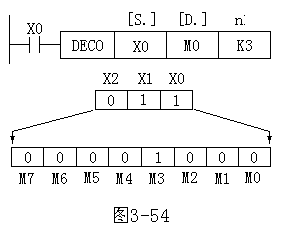
Decoding instruction should be used note:
1)-bit source operands x, t, m, and s, bit destination operand y, m and s, origin K,H,T,C,D,V the operands desirability and z, T,C and d Word destination operand desirability.
2) if the [d.] Specifies the target symbol is a word symbol, t, c, d, n ≦ 4; If elements y, m, s, is n=1~8. Decoding instructions for 16-bit instructions step 7 procedures.
(2) the coded instructions ENCO ENCO (p) order number is FNC42. As shown in Figure 3-55, when the X1 encoding instructions, [s.] The most highs of 1 (M3) median (4) into the target element D10, D10 011 onto the lower 3 bits
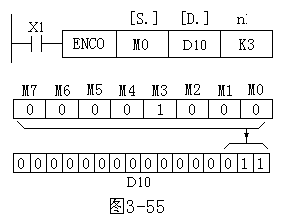
Be aware of when using the encoding directive:
1) operand is a word symbol, t, c, d, v, and z is; the source operand is a symbol, which can be x, y, m, and s. Target element t, c, d, v, and z. Coding instructions for 16-bit instructions step 7 procedures.
2) operands are components that should be used when n ≦ 4, component n=1~8,n=0 when not dealt with for a bit.
3) more than one 1 if source operand specified, only the top 1–effective.
3. ON the median and ON discrimination directive
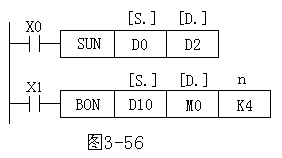
(1) ON the median order SUM (d) SUM (p) order number is FNC43. This directive is used to count the number of specified components 1. As shown in Figure 3-56, when X0 SUM instruction is executed, D0 number 1 in the source operand into the destination operand [D2, D0 not 1, the zero flag M8020 will be set to 1..
Use the SUM command should pay attention to:
1) source all data types of the operands, the target KnY,KnM,KnS,T,C,D,V the operands desirability and z.
2) 16-bit arithmetic when the step 5 program, 32-bit arithmetic and 9 program step.
(2) ON discrimination directive BON (d) BON (p) order number is FNC44. Its function is to detect whether the specified element at the specified position is 1. As shown in Figure 3-56, when X1 is active, BON instruction is executed, and up to the K4 test the source operand D10 4th, when tested at 1 o’clock, the destination operand is M0=1, or M0=0.
BON instruction should be used note:
1) all data types of the source operand and destination operand y, m, and s.
2) for 16-bit arithmetic, 7 procedure steps n=0~15;32 operations accounted for 13 programs, n=0~31.
4. Average instruction
Average instruction (d) MEAN (p) number is FNC45. Its role is the average of n source data will be sent to the specified destination (remainder omitted), if the program specified in the n value is out of range of 1~64 is an error.
5. Alarm set and reset instructions
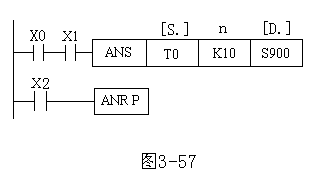
Alarm setting instructions ANS (p) and the alarm reset instructions ANR (p) numbered FNC46 and FNC47 respectively. As shown in Figure 3-57, X0 and X1 as well as ON more than 1S, S900 is set to 1 when X0 or X1 becomes OFF, timer reset, but the S900 remained unchanged at 1; if X0 or X1 becomes OFF again in the 1S timer reset. When X2 is switched on, you will S900~S999 1 alarm reset by reset. If there is more than 1 alarm is set to 1, the minimum components, the alarm is reset.
Be aware of when using the alarm set and reset instructions:
1) ANS the source operand of the instruction T0~T199, destination operand is S900~S999,n=1~32767′; ANR instruction without operands.
2) ANS to 16-bit Command, the program step 7; ANR instructions for 16-bit arithmetic instructions, 1 program step.
3) ANR instructions if you use continuous performance, then one by one in turn reset the alarm on a scanning cycle.
6. Binary square root instructions
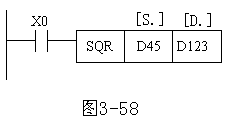
Binary square root instructions (d) SQR (p) number is FNC48. As shown in Figure 3-58, while X0 is valid, then the number will be stored in the D45 square, results are stored in the D123 (only integer).
SQR instruction should be used note:
1) source operand k, h, d, data needs to be greater than 0, the destination operand to d.
2) 16 bit operation step 5 program, 32-bit arithmetic 9 programs.
7. → Binary floating point binary integer conversion instructions
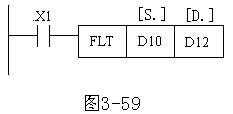
→ Binary floating point binary integer conversion instructions (d) FLT (p) number is FNC49. As shown in Figure 3-59, while X1 is valid shall be deposited in D10 data is converted to floating point numbers and deposited in the D12
FLT instruction should be used note:
1) source and destination operand to d.
2) 16-bit operation step 5 program, 32-bit 9 program step.
 PLC ONE